Appearance
在 Visual Studio Code 裡,這三個其實是 不同層級的 UI 系統。可以理解為:
Activity Bar  →  View Container
       ↓
SCM View      →  特定功能面板
       ↓
Command Palette →  全域指令入口
我用「用途 + extension 怎麼用」來解釋。
1️⃣ Command Palette
快捷鍵: Ctrl + Shift + P
用途:
執行 VS Code 的所有 command
它是 全域指令搜尋器 🔍
功能:
- 搜尋 VS Code 功能
- 執行 extension 指令
- 呼叫 developer tools
- 開設定 / Git / debug 等功能
例如輸入:
Git: Clone或 extension:
AI Commit Messageextension 開發怎麼用
在 package.json
json
{
  "contributes": {
    "commands": [
      {
        "command": "git-ai.commit",
        "title": "AI Generate Commit Message"
      }
    ]
  }
}
註冊 command:
ts
vscode.commands.registerCommand("git-ai.commit", () => {});➡ 就會出現在 Command Palette
2️⃣ SCM View
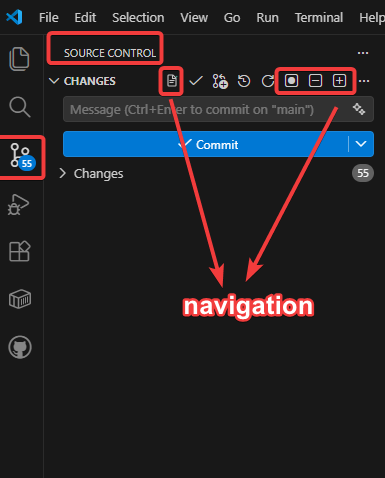
navigation 就是該 extension 的標題列
SCM = Source Control Management
也就是 Git 面板。
左邊這個 icon:
🔀打開後看到:
Source Control
 ├ staged changes
 ├ changes
 └ commit message
這就是 SCM View
SCM View 可以加 UI
你剛剛問的:
commit 勾勾旁邊加按鈕
就是在 SCM View 的 title menu
例如:
json
"menus": {
  "scm/title": [
    {
      "command": "git-ai.commit",
      "group": "navigation"
    }
  ]
}
就會出現在:
[✔ Commit] [AI Commit]SCM 相關 menu:
| menu id | 位置 |
|---|---|
scm/title | commit 區上方 |
scm/resourceGroup/context | staged / changes |
scm/resourceState/context | 檔案右鍵 |
3️⃣ Activity Bar
Activity Bar 是 最左側 icon bar
例如:
📁 Explorer
🔍 Search
🔀 Source Control
🐞 Run
🧩 Extensions
這整條就是 Activity Bar
extension 可以新增自己的 icon
例如:
json
"viewsContainers": {
  "activitybar": [
    {
      "id": "git-ai",
      "title": "Git AI",
      "icon": "resources/icon.svg"
    }
  ]
}
會變成:
📁
🔍
🔀
🐞
🧩
🤖 Git AI
點進去後可以放:
- Tree view
- Custom view
- Webview
三者差異(最重要)
| 系統 | 層級 | 用途 | extension 常用 |
|---|---|---|---|
| Command Palette | 全域 | 執行 command | ⭐⭐⭐ |
| SCM View | Git UI | Git 操作 | ⭐⭐⭐ |
| Activity Bar | UI 容器 | 新增側邊工具 | ⭐⭐ |
一個完整 extension UI 架構
例如 Git AI extension
Activity Bar
   └ Git AI panel

SCM View
   └ AI Commit 按鈕

Command Palette
   └ AI Generate Commit
三個地方都能呼叫同一個 command。
你現在做的 extension 其實是在這裡
從你剛剛貼的:
json
"menus": {
  "scm/title": [...]
}
代表你是在 SCM View 擴展 UI。
也就是:
Source Control
 ├ Commit message
 └ [✔ Commit] [AI Commit]
💡 如果你想做 很強的 Git extension 我可以再教你 VS Code extension 裡 最進階的 UI 系統:
SCM Provider API這可以讓你 做自己的 Git client(像 GitLens 那種)。 很多人做 extension 都不知道這個 API。